
Posters & Digital Media
Posters & Digital Media
Posters and screens across campus help you reach students in physical spaces with high visibility.
Posters
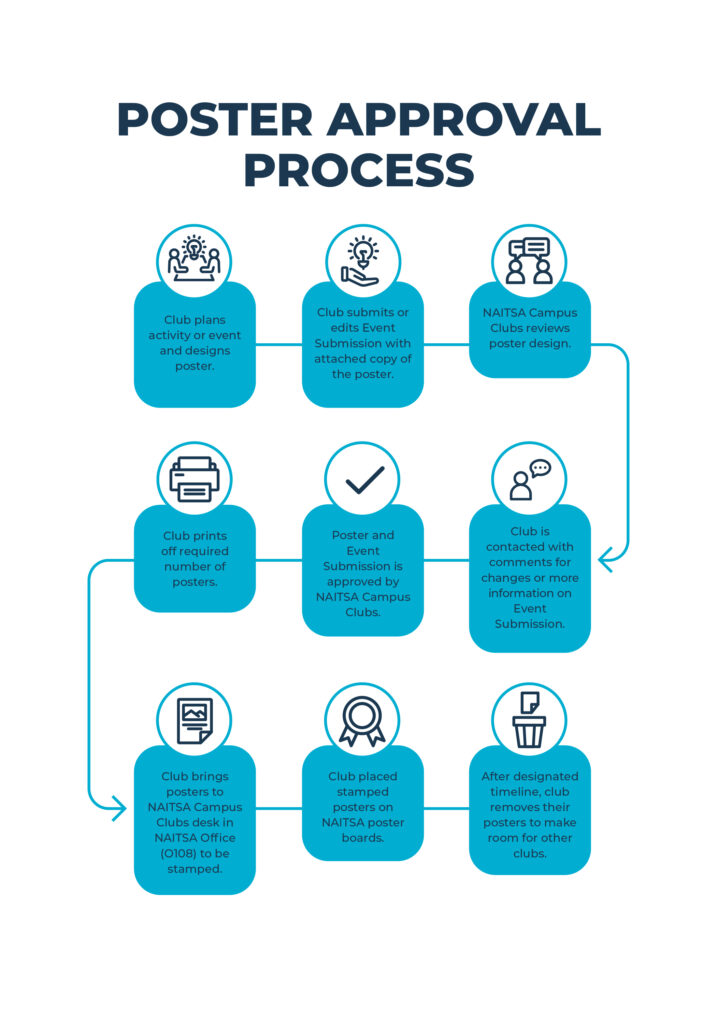
- Max 30 posters per activity; clubs are responsible for printing.
- Max size: 11” x 17”, portrait preferred.
- Each poster must include:
- Your club’s name as host.
- A 2” x 2” white space for NAITSA stamp.
- NAITSA approval via upload through the Event Submission form on ookslife.ca.
Where to Post:
- Only use bulletin boards labeled “Approved for Posting by NAITSA.” Do not post on walls, glass, doors, lockers, from the ceilings, non-NAITSA bulletin boards, or CAT182 glass.
- Clean up your posters after your event. Expired ones will be removed by NAITSA.
- You may remove expired posters from bulletin boards but never remove:
- Posters from other active clubs.
- Any material related to NAITSA elections.
Tri-Stand Advertisement Rentals
Looking for another way to promote your club or upcoming event? Tri-stand advertising gives your club visibility in high-traffic areas across campus. There is no rental fee for the advertising space, but clubs are responsible for printing their own posters.
Tri-Stand Requirements
Before booking a tri-stand, make sure your posters meet the following requirements:
- Poster size must be 20″ x 27″ (W x H).
- Your club name must be clearly displayed on the poster.
- A 2” x 2” white space for NAITSA stamp.
- Each booking includes space for up to two posters. Posters can advertise the same event or different events, but both must belong to the same club.
- Bookings are limited to a maximum of two weeks at a time.
- If the poster is based around an event, the event must be approved on ookslife.ca
- All posters must be stamped by NAITSA Campus Clubs before being displayed.
How to Book a Tri-Stand
1. Reserve a Tri-Stand in CHEQROOM
Book your preferred tri-stand through CHEQROOM for up to two weeks.
There are six tri-stands available across campus. Each listing includes the location in the item title, and the tri-stand you reserve is the location your advertisement will be displayed.
If you’re new to the platform, visit our CHEQROOM guide to learn how to book equipment.
2. Submit Your Poster for Approval
Email a digital copy of your poster to askclubs@nait.ca or bring it to the NAITSA Campus Clubs desk for approval.
Once approved, either by email or at the front desk, posters must be stamped in person by NAITSA Campus Clubs.
Submitting your design before printing is strongly recommended. If a printed poster does not meet approval requirements, your club may need to reprint it at your own expense.
3. Deliver Your Printed Posters
Bring your printed posters to the NAITSA Campus Clubs desk the day before or the morning of your reservation start date.
Please note:
- NAITSA Campus Clubs does not send reminders for poster drop-off.
- Reservation dates will not be adjusted if posters are delivered late.
- Late submissions may reduce the amount of time your posters are displayed.
4. We’ll Handle the Rest
NAITSA Campus Clubs will install your posters at the start of your reservation and remove them when your booking ends.
Approval & Display
All poster approvals are at the discretion of NAITSA Campus Clubs. To avoid delays, make sure your poster follows all advertising guidelines and clearly represents your club and event.
SATVs (Campus TV Screens)
Clubs can advertise on NAITSA’s campus TV screens (SATVs) for $41 per business week.
Requirements
- Image size: 1150 x 865 pixels in landscape format.
- Format: JPG only, 72 DPI, RGB color.
- Max 30 words – visuals work best!
- File size under 5 MB.
- No copyrighted or inappropriate content.
Note: The NAITSA Marketing and Communications department is not responsible for resizing or reformatting your ad.
How to Book
- In your Event Submission form on ookslife.ca, select “SATV Ad.”
- Upload the following:
- Your SATV ad graphic (JPG format)
- A screenshot of your approved event
- A screenshot of your submitted Purchase Request
- Submit everything at least one business week before your ad goes live
* SATV slots are first-come, first-served, so plan ahead!


